Process Map Your Workflows
Process maps help you see where you are in your business. Like a GPS for your operations - you can't get to your destination if you can't see where you're going.
🗺️ Why Process Maps Matter
You can't manage what you can't measure. You can't measure what you can't see. Process maps make your business visible.
What a Process Map Captures
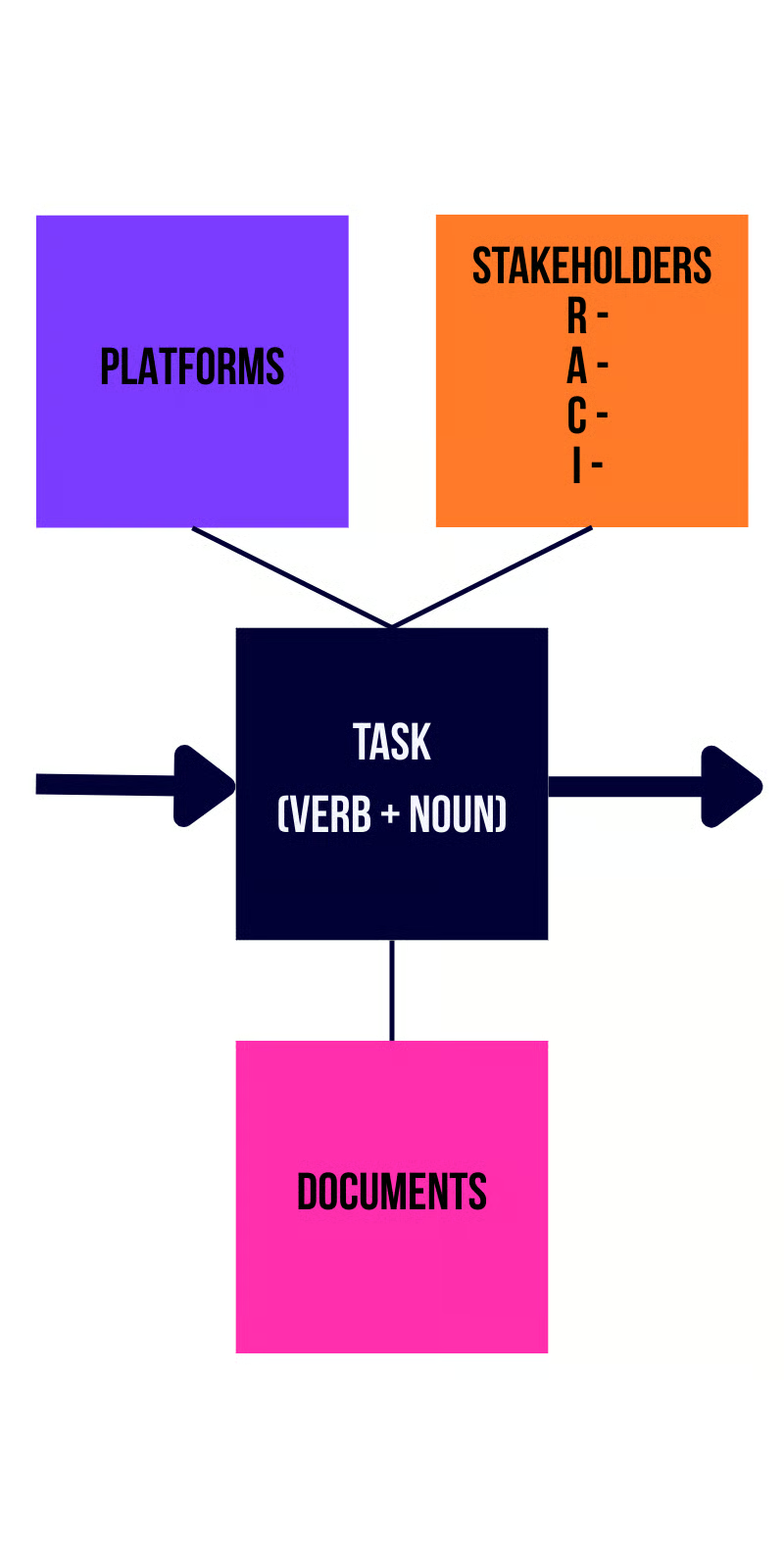
TASK: Every task has a Task name, an Actor responsible, a System it's done in, and Knowledge (documents) it uses or creates.
Get the Full Process Template
Subscribe to unlock the complete template plus worked examples.
Process vs Procedure: Know the Difference
Process (This Template)
The highway - shows the full journey from start to finish
- • "Onboard Client"
- • "Deliver Project"
- • "Manage Sale"
Procedure (Different Template)
The exit ramps - step-by-step instructions for each task
- • "Send Welcome Email"
- • "Create Project Folder"
- • "Schedule Kickoff Call"
📄 The Process Template
Process Header
| Process Name | [Verb] [Noun] - e.g., "Onboard Client", "Deliver Project" |
| Process Owner | [Name / Role] |
| Version | 1.0 |
| Last Updated | [Date] |
| Trigger | [What kicks off this process? e.g., "New client signs contract"] |
| Outcome | [What does success look like? e.g., "Client fully onboarded and ready for first delivery"] |
Task Table
List each task in order. Use Verb-Noun format. One person responsible per task.
| # | Task Name | Responsible | Informed | System | Document |
|---|---|---|---|---|---|
| 1 | [Verb Noun] | [Role] | [Role/Person] | [Tool used] | [Template/Form] |
| 2 | [Verb Noun] | [Role] | [Role/Person] | [Tool used] | [Template/Form] |
| 3 | [Verb Noun] | [Role] | [Role/Person] | [Tool used] | [Template/Form] |
Key Rule: If many people are responsible, no one is responsible. One person per task.
Decision Points (Gateways)
Where does the process branch? What conditions determine the path?
| After Task # | Question | If Yes... | If No... |
|---|---|---|---|
| [#] | [Decision question?] | Go to Task [#] | Go to Task [#] / End |
Systems & Tools Used
What systems are involved in this process? This informs automation opportunities.
| System/Tool | Used For | Tasks |
|---|---|---|
| [Tool name] | [Purpose] | [Task #s] |
Documents & Templates
What documents are created, used, or referenced? Where are they stored?
| Document | Type | Location | Used in Task |
|---|---|---|---|
| [Document name] | [Template / Form / Report] | [Google Drive / Notion / etc.] | [Task #] |
Process Metrics
What should we measure to know this process is healthy?
| Metric | Target | How to Measure |
|---|---|---|
| Cycle Time | [e.g., < 48 hours] | [Time from trigger to completion] |
| [Custom metric] | [Target value] | [How to track] |
📝 Worked Example: Produce Podcast Episode
Real Example: A content creator's podcast production process from recording to publication.
Process Header
| Process Name | Produce Podcast Episode |
| Process Owner | Host (Mike) |
| Version | 1.0 |
| Last Updated | 2025-01-15 |
| Trigger | Weekly content schedule (every Tuesday) |
| Outcome | Episode published and promoted across all channels |
Task Table
| # | Task Name | Responsible | Informed | System | Document |
|---|---|---|---|---|---|
| 1 | Brainstorm Topic | Host | - | Claude | Topic Ideas List |
| 2 | Create Outline | Host | - | Notion | Episode Outline Template |
| 3 | Record Episode | Host | Producer | Descript | - |
| 4 | Edit Audio | Producer | Host | Descript | - |
| 5 | Generate Transcript | Producer | - | Descript | Transcript |
| 6 | Write Show Notes | Host | - | Notion | Show Notes Template |
| 7 | Upload to Host | Producer | Host | Captivate | - |
| 8 | Schedule Publication | Host | - | Captivate | - |
| 9 | Create Social Posts | Host | - | Social Template | |
| 10 | Update Website | Host | - | Website CMS | Episode Page Template |
Decision Points
| After Task | Question | If Yes... | If No... |
|---|---|---|---|
| #4 Edit Audio | Host approved edit? | Continue to #5 | Return to #4 with notes |
| #3 Record Episode | Guest episode? | Add guest intro task | Continue to #4 |
Systems & Tools
| System | Used For | Tasks |
|---|---|---|
| Claude | Topic brainstorming, outline assistance | #1, #2 |
| Descript | Recording, editing, transcription | #3, #4, #5 |
| Notion | Planning, show notes | #2, #6 |
| Captivate | Podcast hosting | #7, #8 |
Automation Opportunity: Descript → Captivate upload could be automated. Social posts could be auto-generated from transcript.
Process Metrics
| Metric | Target | How to Measure |
|---|---|---|
| Total Cycle Time | < 4 hours | Time from brainstorm start to scheduled |
| Edit Revision Rate | < 1 revision | Times sent back for re-edit |
| On-Time Publication | 100% | Episodes published on schedule |
💡 Process Mapping Tips
Verb-Noun Format
Always name tasks as "Do Thing" - Record Podcast, Send Email, Create Report. Not "Podcast Recording" or "Email".
One Responsible Person
If many people are responsible, no one is. Each task has exactly one owner.
Napkin Test
If you can't draw it on a napkin, it's too complex. Break it into sub-processes.
Systems = Automation
Every system you list is a potential automation point. If two tasks use the same system, they might integrate.
🎯 The Bottom Line
A process map is your GPS. Without it, you're driving blind. You might get there eventually, but you'll waste time, miss hazards, and stress the whole way.
The Ultimate Test: Can someone see the full journey from trigger to outcome? Do they know who does what, in what order, using what tools?
If yes, you've got a process map. If no, you've got a wishlist.
Remember: Don't camp around crocodiles. Map your terrain first.
🚀 Next Steps
Want to create visual process maps with AI?
Get the BPMN Prompt for Claude